
Does my small business need a VPN? A plain-English guide to business VPNs
⏱ In about 10 minutes

Affiliate disclosure: Some links on this page are affiliate links. If you buy through them, we may earn a commission at no extra cost to you. Commissions may influence which products we choose to cover, but not our assessment of them. Read the full disclosure.
In this article
The short answer
Short answer
Good news: many small teams don't need a VPN for everyday work, because well-known cloud apps already encrypt the connection. The most helpful first steps are MFA and unique passwords, and you may already have those in place.
A business VPN earns its place when staff regularly handle sensitive data on networks you don't control, when you need to reach internal systems or limit access by IP address, or when you want to enforce connection settings centrally and remove a leaver's access in one place. If that's you, a managed business VPN such as Proton VPN for Business is a sensible extra layer.
What a business VPN actually does
A VPN (virtual private network) creates an encrypted tunnel from a device to the VPN service. Anyone on the same café or hotel network sees only that tunnel, not the sites and apps inside it.
A business VPN adds things a free consumer app doesn't:
- Central management. An admin adds and removes users, and can enforce settings such as two-factor authentication (2FA) for the whole team.
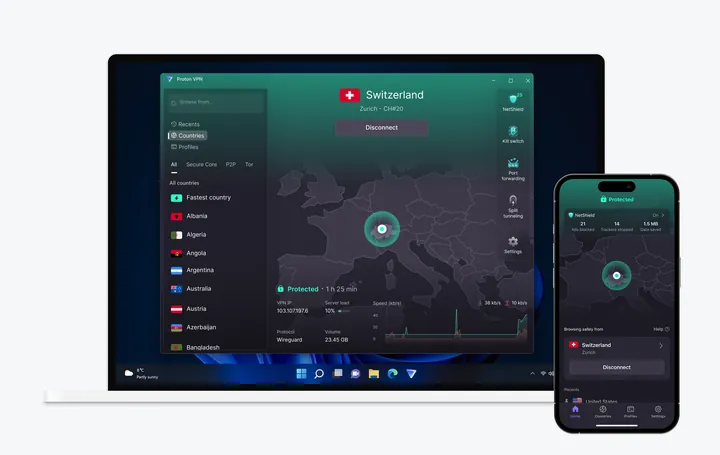
- Always-on protection. A kill switch and always-on mode stop a device from quietly falling back to an unprotected connection.
- Controlled access to company systems. Some plans offer a dedicated IP address or private gateway, so an internal system can accept connections only from your team.
Do you need one? The honest picture
Government agencies give slightly different emphasis, and both views are useful.
- The US Cybersecurity and Infrastructure Security Agency (CISA) says the old advice "to never shop online using a coffee shop's wi-fi connection" had "some truth" a decade ago, but "that's not how people and organizations are compromised today." (CISA)
- The US Federal Trade Commission (FTC) says "because of the widespread use of encryption, connecting through a public Wi-Fi network is usually safe." (FTC)
- The Australian Cyber Security Centre (ACSC) is more cautious for work: public Wi-Fi "can be insecure and are often targeted by cybercriminals". It advises "trusted networks such as your home Wi‑Fi or a personal hotspot". (ACSC, Remote working security)
Our read: a VPN isn't the first step, but it's a helpful one for teams that work on the move with sensitive data. The ACSC also tells businesses to review services exposed to the internet, "such as Remote Desktop, file sharing, or remote administration tools", and to "limit access and secure or disable services that are not needed." (ACSC, Protecting devices, systems and networks) If you open an office system to remote staff, a VPN with a private gateway is one way to limit who can reach it. Your IT provider can help you pick the approach that suits your setup.
| Factor | You probably need a business VPN | You can probably wait |
|---|---|---|
| Where staff work | Often on public or shared networks with customer or financial data | Mostly at the office or at home on a secured router |
| What they use | Internal systems, office servers, or tools that only allow certain IP addresses | Well-known cloud apps with MFA turned on |
| Admin needs | You want to enforce 2FA and settings centrally, and cut access fast when someone leaves | A handful of people, few shared systems |
What to look for in a business VPN
- Central user management, so you can add and remove people from one admin console.
- 2FA enforcement for everyone in the organisation.
- Kill switch and always-on VPN, so devices don't drop back to an unprotected connection.
- Apps for every device your team uses, including phones.
- Dedicated IPs or gateways, only if you need to lock internal systems to your team.
- SSO and audit logs, if you already use a single sign-on provider or need records of who connected.
- A free trial and a refund window, so you can test it with two or three staff first.
Proton VPN for Business: plans compared
Prices as listed on Proton's business VPN pricing page, checked 20 Oct 2026, shown in US dollars on discounted rates. Taxes may apply. Confirm the billing period and total at checkout.
| Factor | VPN Essentials | VPN Professional | VPN and Pass Professional |
|---|---|---|---|
| Listed price | US$6.99 per user/month | US$9.99 per user/month | US$10.99 per user/month |
| Minimum users | 2 | 2 | 3 |
| Discount shown | 22% off | 19% off | 18% off |
| Highlights | NetShield protection against "malware, phishing, scam & ad" threats; centralised user management and organisation-wide 2FA enforcement; kill switch, always-on VPN and split tunnelling; apps for Windows, Mac, Linux, iOS and Android, plus a browser extension | Everything in Essentials, plus SSO and SCIM provisioning, dedicated IPs in 20+ countries and private gateways, network monitoring and audit trails | Everything in VPN Professional, plus the Proton Pass password manager with secure password sharing and password policies |
| Trial | 14-day free trial | 14-day free trial | 14-day free trial |
Proton says VPN Essentials was "Billed at $167.76 for 2 users" and that all plans come with a 30-day money-back guarantee. It also says teams of 20+ users can get onboarding help by phone, and smaller teams by email. (Proton VPN business pricing)
Set it up: step by step
The time guides are rough, for a team of about 5–20 people.
Step 1: Start with the basics (1–2 hours)
MFA on email and other key accounts, unique passwords in a password manager, and automatic updates. A VPN works best alongside these, rather than instead of them. See our 10-step cybersecurity checklist.
Step 2: Decide who actually needs it (15 minutes)
List who works on public or shared networks, and who needs to reach internal systems. You may only need the VPN for part of the team, which keeps costs down.
Step 3: Trial it with two or three people (1 week)
Use the free trial on the devices people really use, including phones. Check that the apps and sites they rely on still work with the VPN on.
Step 4: Turn on the safety settings (30 minutes)
Enforce 2FA for every VPN user, and switch on the kill switch and always-on mode so devices don't connect without protection.
Step 5: Add the VPN to your joiner and leaver steps (ongoing)
Add new staff on their first day and remove leavers on their last. See our guide to removing access when someone leaves.
Quick pick
Quick pick: a business VPN for small teams (product details from Proton's official pages, checked 20 Oct 2026. Not hands-on tested. No ratings. Confirm prices and features on the vendor's site.)
 Best for most small teams that need a VPN: Proton VPN for Business. VPN Essentials lists centralised user management, organisation-wide 2FA enforcement, a kill switch and always-on VPN, and NetShield protection against "malware, phishing, scam & ad" threats. Listed at US$6.99 per user/month (minimum 2 users) on a discounted rate when we checked, 20 Oct 2026. 14-day free trial and 30-day money-back guarantee. → See Proton VPN
- If you also need a team password manager: VPN and Pass Professional. Adds the Proton Pass password manager with secure password sharing and password policies, listed at US$10.99 per user/month (minimum 3 users) on a discounted rate when we checked. Compare password managers in our small team guide. → See Proton VPN
The free steps above are a great place to start. See all our quick picks.
Honest limits
Free: the Small Business Password & Access Checklist
A 1–2 page checklist that turns this article into a to-do list: which accounts to protect first, how to set up shared access, and what to do when someone joins or leaves.
You only get emails if you tick the consent box. Unsubscribe any time. See our privacy policy.
Frequently asked questions
Does a small business need a VPN?
Not always. If your team mostly uses well-known cloud apps with MFA, you're already in good shape and a VPN is optional. It's more useful when staff often work on public networks with sensitive data, or need to reach internal systems.
Is a business VPN different from a personal VPN?
Yes. A business VPN adds central user management, 2FA enforcement for the whole team and the ability to remove a leaver's access in one place. Some plans also add dedicated IP addresses or private gateways.
Does a VPN protect us from phishing?
Not on its own, though it can help. Proton lists NetShield protection against malware, phishing and scam sites on its business plans. Friendly staff training and MFA do most of the work here.
Will a VPN slow down our internet?
Proton lists high-speed connectivity across 140+ countries. The easiest way to see how it feels for your team is the 14-day free trial with a few staff.
Related guides
- Cybersecurity tools
- My team works from cafés and home Wi-Fi: is public Wi-Fi safe for business work?
- Our files are scattered across laptops and USB sticks: how to store business files securely
- 10-step basic cybersecurity checklist
Sources
Government bodies first. All links checked and loading on 20 Oct 2026.
- Australian Cyber Security Centre, Small business cyber security handbook: Remote working security · Protecting devices, systems and networks
- US Cybersecurity and Infrastructure Security Agency: Cyber guidance for small businesses
- US Federal Trade Commission: Are public Wi-Fi networks safe? What you need to know
- Vendor pages (checked 20 Oct 2026): Proton VPN business pricing · Proton for Business plans
About our review process
We pick products from official information and say clearly when we haven't tested something hands-on. Commissions may influence which products we choose to cover, but not our assessment of them. See how we work.